
Event Discovery Platform
I designed a responsive platform that helps users easily discover local events based on their interests and location. From user research to high-fidelity UI, I focused on clarity, ease of use, and accessibility, creating a smooth experience for browsing, filtering, and exploring what's happening nearby.


About this project
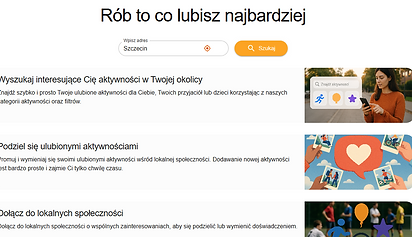
🧩 As a freelance UX/UI Designer, I worked with two Product Owners who led the concept and vision for an innovative event discovery platform - designed to make leisure time planning easier, especially for parents. My role focused on turning their product idea into a responsive, user-friendly experience for web and mobile.
📚 While the core information architecture was owned by the Product Owners, I contributed suggestions to improve how content was structured and grouped - ensuring it remained usable, intuitive, and easy to navigate. I applied Material Design principles and created a clean, accessible interface supporting search, filters, maps, and saved events.
🚀 The result is a modern, mobile-friendly platform with a thoughtful layout, polished UI, and WCAG-compliant interaction design.


Context & Team
The Problem
The Goal
🏢 Client: Freelance project for a startup idea
🧑🤝🧑 Team: 2 Product Owners ( Developers) + 1 UX/UI Designer (me)
⏳ Timeline: Ongoing (February 2025 – present)
🧩 Role: UX/UI Designer (freelance contributor)
The Product Owners noticed how hard it is, especially for busy parents, to find relevant, verified activities in one place. Existing tools were either cluttered, focused on nightlife, or poorly optimized for mobile.
This product was created to solve:
🔎 The hassle of discovering family-friendly and local events across different websites
📆 Poor filtering by category, location, or time
📉 Low engagement and retention in existing apps due to confusing UI or lack of trust
📵 A lack of intuitive, mobile-first platforms focused on real-world use cases (like “what’s nearby this weekend for a family of 4?”)
Build an event discovery experience that is:
✅ Mobile-first, clean, and visually inviting
✅ Tailored to casual and busy users - especially parents
✅ Simple to search, filter, and explore events (without login barriers)
✅ Ready for future growth: user accounts, calendar integrations, favorites
✅ Aligned with accessibility standards (WCAG) for inclusive usage
My Contributions
🔍 UX Process
-
Discovery & Research: competitive benchmarking, heuristics
-
Personas & Scenarios: defined key user segments (e.g. young parents, weekend seekers)
-
User Flows: mapped out key tasks (search → filter → save)
-
Wireframes & Prototypes: structured responsive views and interactive flows
-
UI Design: built RWD interface with clear hierarchy and strong contrast
🧱 Components & Structure
-
Designed: hero search, landing, login, filter panels, results list (list & map), event cards, favorites
-
Suggested UX logic for interaction: smart defaults (e.g. location = browser-based), active filters, empty states, category chips
-
Supported IA refinement by proposing content groupings and tag hierarchies
-
Created a style guide: color system, typography, spacing, icons
♿ Accessibility
-
Designed with keyboard navigation and semantic HTML in mind
-
Ensured WCAG-compliant color contrast in both light and dark modes
-
Prioritized readability and UI clarity across breakpoints
Outcomes & Early Feedback
📱 Fully responsive interface supporting mobile-first use
🧠 Clear filtering and search logic adapted to casual users
🌈 Clean visual language tailored to target audience
♿ Solid accessibility groundwork (tested via color contrast & keyboard nav)
💬 Positive initial feedback from early testers: “finally something that doesn’t overwhelm”
What I Learned
-
How to design intuitive, mobile-first search and filtering flows based on real user needs
-
How to create a visually clear, accessible interface that’s fast to build and easy to scale
-
How to co-create with senior stakeholders while leading hands-on execution
-
How to iterate quickly - applying real feedback to evolve the product across sprints
🚀 What’s Next
We plan to test the MVP with a small group of friends from one city to gather early feedback in a real-world context. Based on their input, we’ll conduct usability testing, refine the design, and iterate on key flows and features.
The goal is to validate the core experience before considering a broader rollout.
